An Open Layer Around the Smart Board

Your Canvas.
Not Your Competitor.

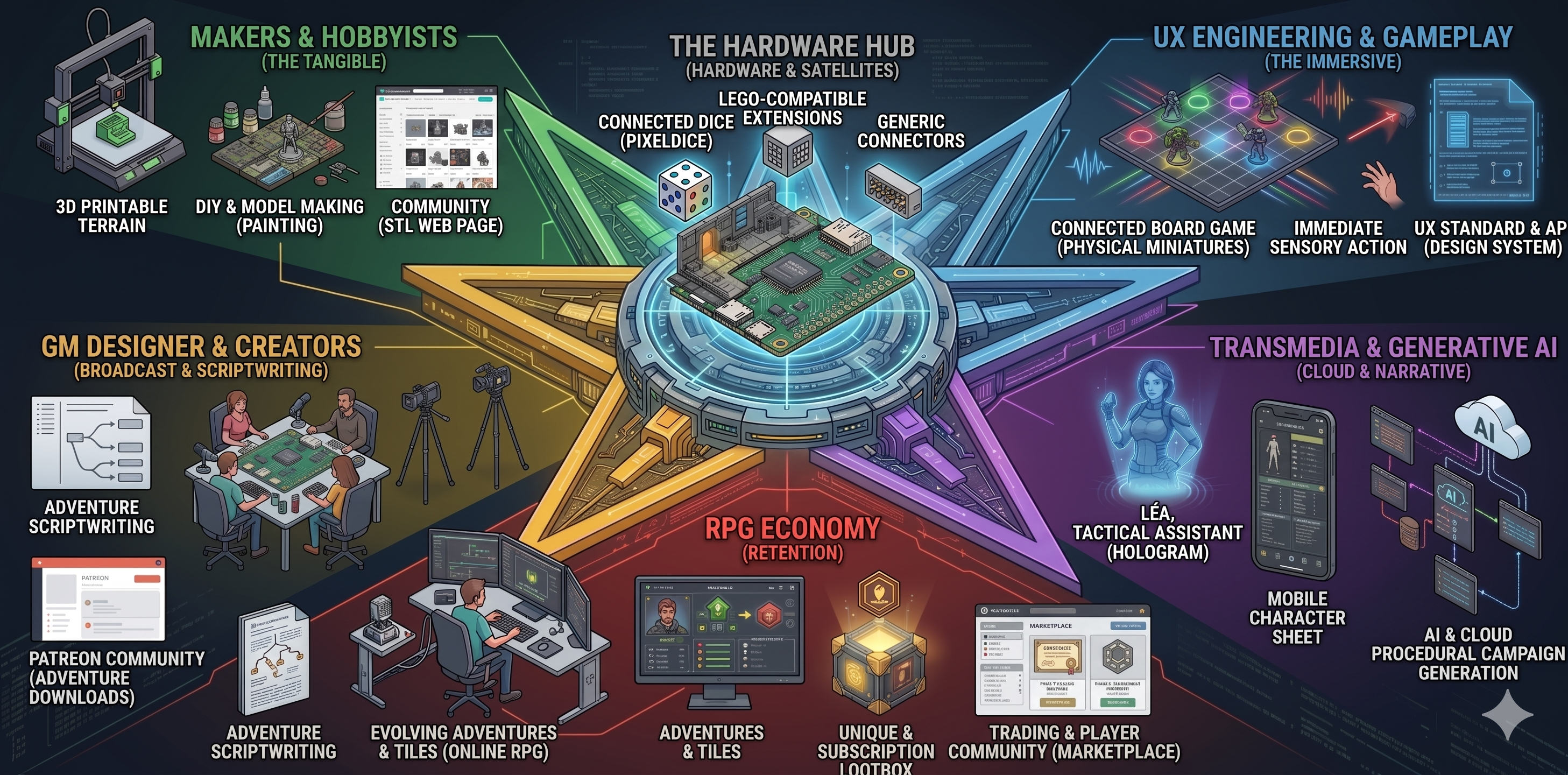
The PCB is a standard. Everything around it is open: the scenery on top, the hardware plugged into the side, the scenarios written in markdown. Three communities the platform exists to amplify - never replace.

Tiny Expeditions ecosystem - four online spaces
🔧

The Workshop

Design, sell, and download new worlds. Community-certified 3D models and scenarios - the creator economy for tabletop.

🎙️

The Assembly

The storytellers' stage. Find your next Game Master, broadcast your sessions, follow ongoing sagas. Think D&D meets Twitch.

🏆

The Pantheon

Show off your heroes. World rankings, detailed stats, and progression tracking - your character sheet, public and persistent.

🛒

The Market

Track your collection, evaluate rarity, and trade on the secondary market. Every tile and card has a history.

---
id: laboratory
title: Le Laboratoire
description: >
    Tutoriel. Le Sergent Dupuis se reveille dans le laboratoire d'un vaisseau
    alien, libere de sa stase par Lea, une IA hackeuse. Il doit utiliser la
    console, choisir son arme et affronter un xenomorphe pour s'echapper.
    Modele sandbox - le joueur interagit librement avec les objets.
version: 3
players: 1
difficulty: 1
duration_min: 10
tags: [tutorial, sci-fi, solo]
level: 1
theme: hvac
usb_edge: north
voices: Dupuis:player, Lea:guide
---

# Le Laboratoire

> *Tutoriel - Apprenez a vous deplacer, interagir, choisir et combattre.*
> *Le joueur explore librement. Lea guide. Les objets reagissent.*

---

## TILE

```
[*|*|*|*|*|*]
[*|C|C| | |*]
[*| | | |D|*]
[*| | |X|D|*]
[*|P| | | |*]
[*|*|*|*|*|*]
```

```json
{
    "P": { "type": "spawn", "name": "Player" },
    "C": { "type": "object", "name": "Console" },
    "D": { "type": "door", "name": "Sas", "state": "locked" },
    "X": { "type": "spawn", "name": "Xenomorphe", "entity": "xenomorph" }
}
```

## SCENARIO

[🔌| left | output]
[🔌| right | input]
[🔊| ambient | theme | 50]

### SasDoorOpen
> event: jst_on(right)
[🔌| left | on]

### SasDoorClose
> event: !jst_on(right)
[🔌| left | off]

### INTRO
> Dans cette introduction, le Sergent se reveille dans une capsule de stase
> On lui expique la situation pour qu'il apprenne a se deplacer vers la console

[📌| Player]
[🔊| sfx | bootup]
[🔌| left | on]

**Lea**:
Sergent... sergent, vous m'entendez ? C'est Lea. J'ai pirate votre capsule de stase. [short pause] Le vaisseau est en quarantaine. Trouvez la console de controle, VITE.

**Dupuis**:
[troubled] Ou est-ce que je suis... il fait si froid...

**Lea**:
Le froid est normal, Sergent. Ecoutez ma voix. Le terminal est a trois metres a votre gauche. Rampez si vous devez, mais connectez-vous.
[🎯| C]
[⏳]

### LEARN TO MOVE
**Lea**:
Bien, Gardez ce rythme. Suivez les diodes d'urgence au sol. La console est la seule source d'energie active.

**Dupuis**:
Diodes... ok... Lea ? C'est pas le protocole de reveil... On n'est pas arrives. Qu'est-ce qui a declenche l'alarme ?
[⏳]

### NEXT MOVE
> Apres le 2e mouvement on relance le dialogue pour animer le jeu

**Lea**:
Infestation ! Des choses qui ne sont pas d'ici - je vous ai reveille pour que vous ayez une chance - trouvez une arme avant qu'elles ne captent votre position !
[⏳]

### LEARN TO EQUIP
> trigger: pawn_on(C)
> Quand le joueur arrive sur la console on va jouer un scenario pour qu'il synthetise une arme

[🎚️| player.speed = 1]
**Dupuis**:
J'y suis ! Allez, donne-moi une arme... [angry] Foutue machine ! L'energie est critique. Le synthetiseur ne peut generer qu'une seule matrice. Vibrolame ou pistolaser...
[⚙️| run | console.Synthesize]
[💡| off | C]

#### Failure
**Lea**: [urgent] Reessayez, vite !

#### Fumble
**Lea**: [urgent] Reessayez, vite !

#### Success

##### pistolaser
[🔊| sfx | pistolaser]
**Lea**:
Pisto-Laser valide ! Gardez vos distances et visez les masses thermiques - mais attention au flash, ca va trahir votre position !

##### vibrolame
[🔊| sfx | vibrolame]
**Lea**:
Lame thermique ! - C'est silencieux - mais vous allez devoir les laisser approcher au contact. Ne ratez pas le premier coup !

### LEARN TO FIGHT
> trigger: player.has_item("pistolaser") || player.has_item("vibrolame")
> Maintenant qu'il a une arme on va lui apprendre a combattre

#### Door
**Dupuis**:
Lea, porte bloquee ! Securite biometrique hors-ligne. Sortez-moi de ce laboratoire !

[🚪| open | D]
[🔌| left | off]

**Lea**:
Je force le systeme - attendez, les capteurs de pression s'affolent... - [gasps] [shouting] PIC THERMIQUE ! CONTACT IMMEDIAT ! TIREZ !

[📌| X]

#### DEATH
> trigger: player.hp <= 0
> Si le joueur meurt on lui propose de recommencer
**Lea**:
[shouting] Sergent ! Repondez ! [gasps] Capteurs biometriques plats... [trembling] Non... ils l'ont eu. [rapid-fire] Reinitialisation de la liaison...
[🏁| defeat]

#### XenomorphDead
> trigger: xenomorph.dead
[🔊| sfx | xenodeath]

**Dupuis**:
[breathing fast] C'est mort... [gasps] Bordel, Lea... [exhausted] C'est quoi ce cadavre ? Rien ne saigne comme ca...

[💡| acid_drip | xenomorph]

**Lea**:
[interrupting] L'acide ronge le plancher ! [rapid-fire] L'integrite de la coque lache - sortez de ce bloc immediatement !
[🎯| D]

##### EXIT
> trigger: pawn_on(D)
> Si le joueur arrive a la sortie on poursuis l'aventure
**Dupuis**:
[speed] J'y suis. [pauses] [deadpan] Lea... Dites-moi que je reve... [sighs] Ils ont transforme le vaisseau... c'est un nid geant.
[🏁| victory]

Scenario Authors - The Adventure in Markdown

You write what happens and when. Never how. The grid is your page; each cell is a paragraph; players turn the page by placing a pawn.

No code. No engine to learn. Write markdown with triggers: light states, sound cues, NPC dialog. The firmware resolves effects, combat, and narration. Your scenarios are stored locally-zero cloud dependency.

How your story plays:

  1. Detect — Figurine placed; reed switch fires; the board builds a live map of every pawn position
  2. Narrate — Speaker delivers your dialog; 80 LEDs pulse the active room and fire your light cues
  3. Resolve — Dice rolled automatically; your branching logic routes the consequences
  4. Objects & NPCs — Console, pistolaser, xenomorph: define entities in markdown; the engine instantiates, tracks, and reacts to them
  5. Live Engine — A JS engine runs on-board and resolves every situation dynamically — your scenario is data, not code
AI + Markdown: Generate scenarios. Lets AI draft branches; you curate the story. With Cloud AI provide dynamic narration.
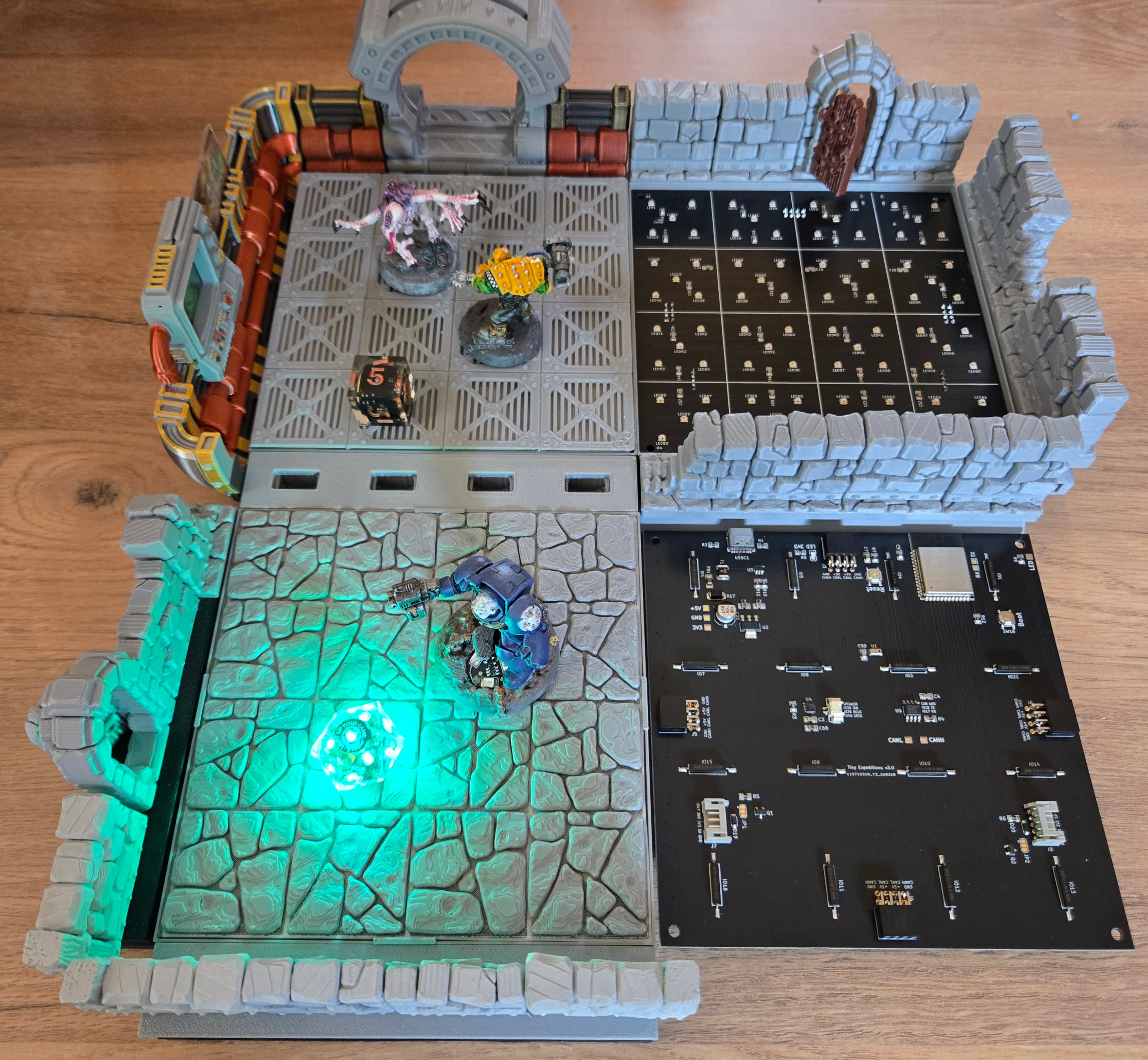
3D-printed terrain with PCB underneath

3D Designers - The Scenery on Top

Your terrain is the universe. Build a fantasy dungeon, a sci-fi outpost, a gothic crypt — and give scenario authors a world to write inside. Players choose their adventure by choosing your world.

Open theming spec: wall pins, floor lip, door slots — your terrain snaps onto any Tiny Expeditions tile. Inspired by what modular dungeon creators like Dragon's Rest pioneered for the community.

  • Your world surfaces every time a player picks a scenario theme
  • Top designs featured on the platform
  • Direct collaboration on the spec as new board generations and sensors ship
AI + Image: Generate printable STL in a given theme for a given situation.
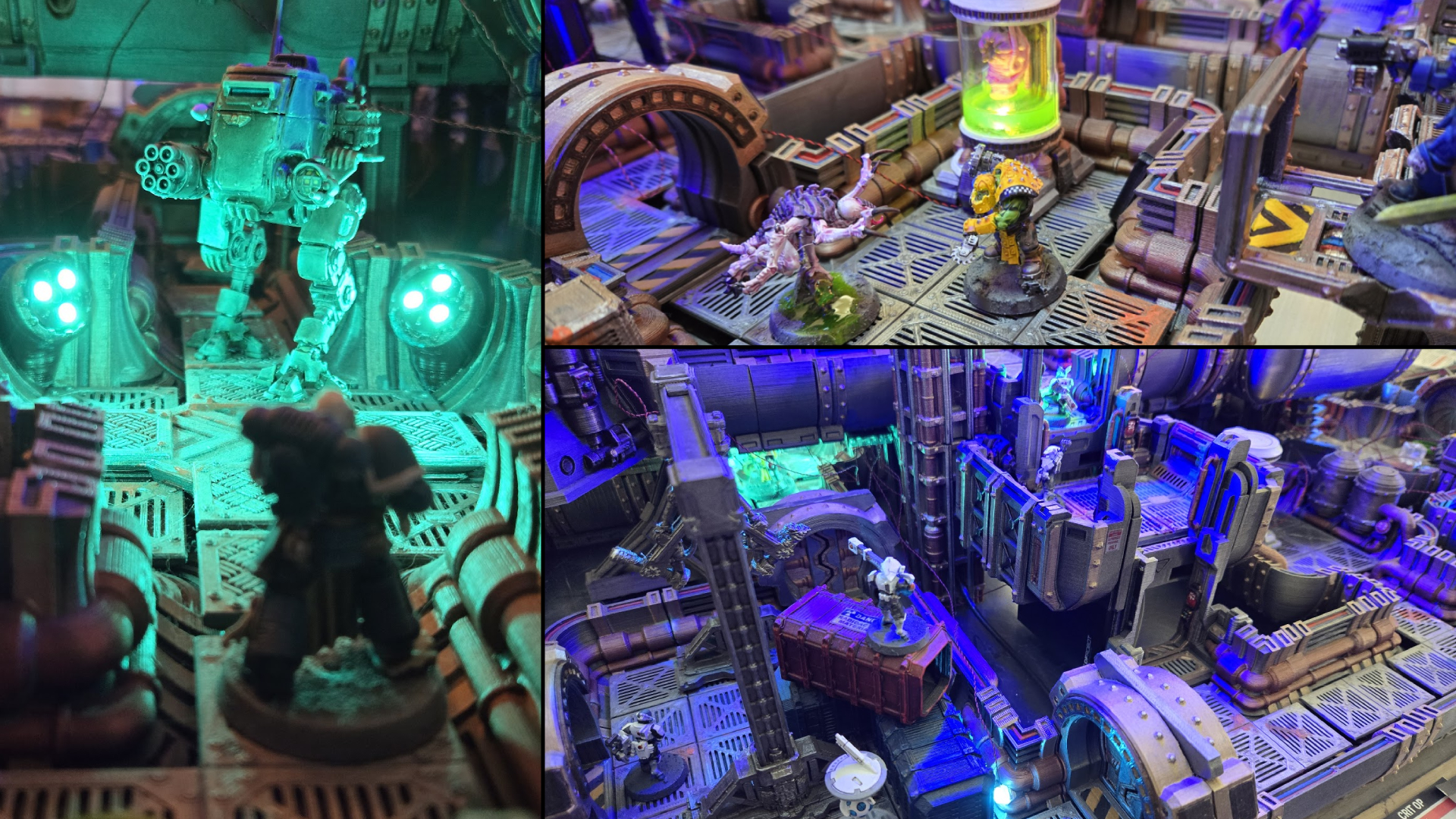
JST plugin connector with LED and reed switch

Makers & DIY - Extend the Board's Senses

Two JST extension ports per tile expose power and GPIO. Your circuit talks to the scenario. The scenario talks back to your circuit.

The two JST ports per tile are a plugin interface. The demo shows the simplest case: a reed switch on a door + an LED strip, driven on/off by the scenario in real time. The same ports connect any inputs (GPIO sensor) or output (5V / 3.3V USB device).

The physical layer is fully yours: paint, resin, special inks, weathering — any finishing technique that works on PLA or resin prints. And because tiles connect via SmartLink, you can stack floors. A ground level connects to an upper level, each running its own scenario. The labyrinth goes vertical.

With AI assistance: Schematics, board layout, and integration ideas-let AI sketch, you validate.

Join the Expedition

Connect with other creators, get early access to specs, and help shape the platform.

Start Creating

Documentation, plugin examples, and scenario templates included.